Python 3
Python 3
Python is an interpreted language, which means the code itself is not compiled into machine code like C code. Instead, it is interpreted by the Python program, and the instructions in the script(s) are executed. Python is a high-level language meaning the scripts we produce are simplified for our convenience so that we do not need to worry about memory management, system calls, and so forth.
- So why learn it?
-> It is a popular choice for automation of everyday tasks or the development of tools.
-> In the InfoSec world, plenty of so-called PoCs (Proof of Concepts) are written in Python, as are many popular tools for penetration testing.
IDLE
- We can utilize IDLE, Python’s own integrated development environment, directly in our terminal for quicker prototyping.
- To exit the IDLE again, we type exit(0). The number 0 is the return code of the Python process, where 0 means all is OK and a number different from 0 indicates an error.
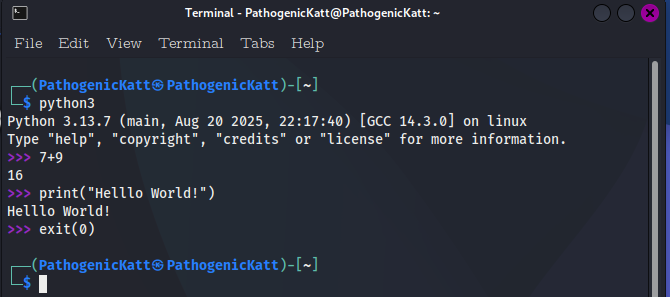
- Printing Multiple Variables:
.PNG)
Shebang!
- Another method is based on adding the shebang (#!/usr/bin/env python3) in the first line of a Python script.
- On Unix-based operating systems, marking this with a pound sign and an exclamation mark causes the following command to be executed along with all of the specified arguments when the program is called.
- We can give the Python script execution rights and execute it directly without entering python at the beginning on the command line. The file name is then passed as an argument.
.PNG)
Introduction to Variables
In Python, a variable is our way of storing a value of some sort in memory. For example, a number, some text, or the bytes of an image. Like in math, variables have a name that we make up, but the names should be descriptive in Python.
- Below are some examples:
advice = "Don't panic" ultimate_answer = 42 potential_question = 6 * 7 confident = True something_false = False problems = None # Oh, and by the way, this is a comment. We can tell by the leading # sign. - strings: The first variable, advice, is a string. Strings in Python can be specified using both “double quotes” and ‘single quotes’. When typing out strings that contain either symbol as a natural part of the string itself, e.g., don’t lie, it is a good idea to use the other kind of quotes. Writing “don’t lie” works just fine. However, using single quotes would throw an error.
- Integers: Following the advice variable comes two numbers, or integers, the first of which is a number. The second variable, potential_question, is also a number but not until runtime. During runtime, the equation 6 * 7 is evaluated to 42, which is then stored as the variable.
- Booleans: Following the number variables come two boolean variables, confident and something_false. A boolean value is a truth value and can be either True or False. Right after comes the variable problems, which is set to None. None is a special “nothingness” of a value similar to null in other languages.
Combining Variables
- Basic Math Operations
>>> 10 + 10     # Addition
20
>>> 20 - 10     # Subtraction
10
>>> 5 * 5       # Multiplication
25
>>> 10 / 5      # Division
2
For all of these values we can define variables to store them. - Saving Values to Variables
>>> add = 10 + 10
>>> sub = 20 - 10
>>> multi = 5 * 5
>>> div = 10 / 5
>>>
>>> print(add, sub, multi, div)
20 10 25 2
This also allows us to work with the values stored in the individual variables. - Working with Variables
...SNIP...
>>> print(add, sub, multi, div)
20 10 25 2
>>> result = (add * sub) - (multi * div)        # (20 * 10) - (25 * 2)
>>> print('Result: ', result)
Result:  150
Another handy feature of the Python interpreter is that the IDLE assigns the latest expression to the variable _. This allows us to continue working with the last value.>>> 38 + 4 42 >>> 50 - _ # 50 - 42 8
Note however that this is true only for IDLE. In regular Python code that is run from .py files e.g. from the command line or in an Integrated Development Environment, _ is simply just a variable. It is often used as a placeholder for values we do not care about, for example if a function returns two values, but only one of them is important to us, for example x_coord, _ = get_position_of_birb(). This is to show other developers, and ourselves a few months into the future, that the value returned, e.g. the y-coordinate from the previous example, is not needed.
Conditional Statements and Loops
- Below is an example of what an if/else (conditional Statements) block of code looks like:
happy = True
if happy:
  print("Happy and we know it!")
else:
  print("Not happy...")
A few things happened here already. Pay close attention to the indentation of the code. Python does not require how wide each indentation must be, as long as there is consistency. We also have to consider the situation that we want to bring in more than just two different options. The elif (else-if) expression means that we continue with this one if the previous condition is not met. Basically, elif is the shortened notation of nested if statements.
- If-Elif-Else Statement:
happy = 2
if happy == 1:
  print("Happy and we know it!")
elif happy == 2:
  print("Excited about it!")
else:
  print("Not happy...")
This brings us to the first type of loop: the while-loop. Consider the below code: - The While-Loop:
counter = 0
while counter < 5:
  print(f'Hello #{counter}')
  counter = counter + 1
The loop checks if the counter, which is set to 0 initially, is below 5 - it is - and then prints “Hello #0” and sets the counter variable to the value of itself (0) + 1. Next iteration, it checks if counter, which is now 1, is less than 5 - it is - and then prints “Hello #1” and sets counter to the value of itself (1) + 1. On the 3rd iteration, counter is 2 (because we started at 0), and so forth. Hebce, the output:
Hello #0
Hello #1
Hello #2
Hello #3
Hello #4
Loops and Lists
Recall from the previous section that a loop is a block of code that keeps iterating the contents until some condition is met. This section will look at one kind of loops often referred to as the “for-each loop”. This is a loop that iterates over each element in some collection of elements and does something for each individual element.Consider the below line of code:
- A List of Strings
groceries = ['Walnuts', 'Grapes', 'Bird seeds']This is a list of strings. The square brackets indicate a list, and the comma-separated values inside of it are strings. Similarly, [] is an empty list, and [42] is a list with just one element, the int value 42. When pointing out values inside lists, Python numbers the elements in a list from 0 and upwards. This means that the above list has three elements and that the first element is at index 0. The second element is at index 1, and the third element is at index 2. Like so:
- Value Indexes:
groceries = ['Walnuts', 'Grapes', 'Bird seeds']
# index:         0          1          2
We can also write lists the following way for easier readability (especially with much larger lists):
- Alternative Syntax:
groceries = [
  'Walnuts',    # index 0
  'Grapes',     # index 1
  'Bird seeds'  # index 2
]
The last thing to mention about lists before we move on is how to retrieve an element from the list. Say we want to print the first element to the console. This is done by referencing the variable name of the list, e.g., groceries and which index is desired like so: groceries[0] to get the first element, ‘Walnuts’. The last element, ‘Bird seeds’ would in this example then be groceries[2] because the value ‘Bird seeds’ is located at index 2 in the list. Python can even count backward, so we could also have gotten the last element of the list - regardless of how many elements are in it - by asking for index -1: groceries[-1]. It works the same way we did with strings.
- Strings Indexing: Strings can also be indexed. This is especially useful when we want to filter out certain parts of some output. We can think of each word as a list of letters with indexes. However, there is also the negative index, which allows us to start counting the string letters from the end. Let us take the following string as an example: ABCDEF
| Negative Index | Index | Character |
|---|---|---|
| -6 | 0 | A |
| -5 | 1 | B |
| -4 | 2 | C |
| -3 | 3 | D |
| -2 | 4 | E |
| -1 | 5 | F |
We use the index to tell Python which letter we want to output from it. In this example, we want to output the first and the last letter.
.PNG)
We can also work with these indexes to give us particular substrings.
- Substrings:
>>> var = "ABCDEF" >>> print(var[:2]) # Up to index 2 AB >>> print(var[2:]) # Ignore everything up to index 2 CDEF >>> print(var[2:4]) # Everything between index 2 and 4 ("2" is counted) CD >>> print(var[-2:]) # Up to negative index 2 (last two characters) EF - For-Each Loop
As already mentioned, Python allows us to loop over each element (or value) in a list. Consider the below piece of code where we at first have defined a list and then the loop.
- The For-Each Loop
  groceries = ['Walnuts', 'Grapes', 'Bird seeds']
  for food in groceries:
  print(f'I bought some {food} today.')
The for-each loop is structured this way: first the for keyword, then the variable name we choose, followed by the in keyword and a collection to iterate over. In this example, we told Python to run the code inside the block “for each element,” where we then call the current element food. We then tell Python where to find these elements, which in this case is inside groceries”.
- Output:
  I bought some Walnuts today.
  I bought some Grapes today.
  I bought some Bird seeds today.
- The For-Each Loop
Defining Functions
- Functions:
-> Functions let us define code blocks that perform a range of actions, produce a range of values, and optionally return one or more of these values. Like in math, where f(x) is a function f of x and produces the same result when given the same input. For example f(x) = x + 1 is a function f of x which returns x + 1. Thus f(2) would be 3, because f(2) = 2 + 1 which is 3.
- First Function:
def f(x):
return 2 * x + 5
returned_value = f(2) # Which in case will be 9
- First Function:
- Functions which parameters are not named explicitly are called positional parameters.
- When we call a function and explicitly set the value of a parameter, e.g. foo(bar=42), this parameter is called a named parameter.
Making Code Classy
- A class is a spec of how an object of some type is produced. The result of instantiating such a class is an object of the class. Let us look at an example:
- The DreamCake Class:
class DreamCake:
eggs = 4
sugar = 300
milk = 200
butter = 50
flour = 250
baking_soda = 20
vanilla = 10
baking_soda = 20
vanilla = 10
topping = None
garnish = None
is_baked = False
#----
# The __init__ function of the class, automatically gets called by Python once a new instance of a class is requested.
# please notice about the __init__ function, the self parameter. This parameter is a mandatory, first parameter of all class functions.
def __init__(self, topping='No topping', garnish='No Garnish'):
  self.topping = topping
  self.garnish = garnish
#---
def bake(self):
  self.is_baked = True
#---
def is_cake_ready(self):
  return self.is_baked
#---
plain_cake = DreamCake() # The topping and garnish default to "No topping" and "No garnish" for a plain cake, respectively.
chocolate_cake = DreamCake(topping='Chocolate frosting') # We need to add chocolate frosting on top for a chocolate cake, but no garnish (defaults to "No garnish").
luxury_strawberry_cake = DreamCake(topping='Strawberry frosting', garnish='Chocolate bits') # Our luxury cakes have the topping and garnish explicitly set.
#---
# This can, of course, also be specified without using named parameters for brevity:
luxury_strawberry_cake = DreamCake('Strawberry frosting', 'Chocolate bits')
#---
# Now that we have objects of the class DreamCake stored in variables, we can call the functions of the class on the object variables by appending a . and the function.
chocolate_cake.bake()  # Call the function "bake" on the object. This will set the chocolate_cake as baked and the value of is_baked to True.
is_cake_done = chocolate_cake.is_cake_ready() # This is initializing the value of is_cake_done to True since we return the value from is_baked.
print(is_cake_done)  # Prints "True" because we called "bake" earlier
Advanced Notes on Classes
A few examples below
- Magic methods:
_init__str__contains__eq_
.PNG)
Another two Magic Methods worth mentioning are the__enter__and__exit__functions, allowing us to create classes that support using the with keyword. The with keyword will enable us to specify the default functionality of a class for build-up and teardown procedures. For example, the class C2TcpConnection which represents a TCP connection to a C2 server.
-> The build-up step could include initiating a socket and attempting to authenticate given input from external sources.
-> The teardown step could include proper error handling and a guarantee of properly closing the socket after use.
Managing Libraries in Python
The most popular way of installing external packages in Python is by using pip. According to the author, pip is short for “pip installs packages”
- Installing a package:
python3 -m pip install [package] - Upgrading a package:
python3 -m pip install --upgrade [package] - Uninstalling a package:
pip uninstall [package] - Listing installed packages:
python3 -m pip freeze.PNG)
It just so happens to be the case that pip supports maintaining packages from a requirements file. This file, often called literally requirements.txt, contains a list of all the required packages needed to run the script successfully. The format is quite simple. We would copy the above freeze output and save it as a requirements file. - Install from requirements.txt:
python3 -m pip install -r requirements.txt- This will then go through each of the requirements and install them by selecting the latest available and permitted version.
The Importance of Libraries
- The Requests Package:
- The requests library is an elegant and simple HTTP library for Python. From the documenation:
Requests allows you to send HTTP/1.1 requests extremely easily. There’s no need to manually add query strings to your URLs, or to form-encode your POST data. Keep-alive and HTTP connection pooling are 100% automatic, thanks to urllib3. - Installing the package:
python3 pip -m install requestsOnce installed, we can import the library into our code by typing import requests and then use it right away.
- The requests library is an elegant and simple HTTP library for Python. From the documenation:
The BeautifulSoup Package
Another handy package is the BeautifulSoup library (rather beautifulsoup4). This library makes working with HTML a lot easier in Python. Before, we learned how to query a website and get output back, which could be the raw HTML. Digging through this HTML can be cumbersome if we have to search through textual output by hand. BeautifulSoup turns the HTML into Python objects that are much easier to work with and allows us to analyze the content better programmatically.
- Installing the package:
python3 -m pip install beautifulsoup4
-> Hence,before-hand we have the following (HTML - Ugly Format):
<html>
<head><title>Birbs are pretty</title></head>
<body><p class="birb-food"><b>Birbs and their foods</b></p>
<p class="food">Birbs love:<a class="seed" href="http://seeds" id="seed">seed</a>
   and
   <a class="fruit" href="http://fruit" id="fruit">fruit</a></p>
 </body></html>
-> This HTML looks a little messy. We’ll then load this into BeautifulSoup and print it in a nicely formatted way, as follows:
 from bs4 import BeautifulSoup
html_doc = """ html code goes here """
soup = BeautifulSoup(html.doc, 'html.parser')
print(soup.prettify())
-> which then prints (HTML - Pretty Format):
<html>
 <head>
  <title>
   Birbs are pretty
  </title>
 </head>
 <body>
  <p class="birb-food">
   <b>
    Birbs and their foods
   </b>
  </p>
  <p class="food">
   Birbs love:
   <a class="seed" href="http://seeds" id="seed">
    seed
   </a>
   and
   <a class="fruit" href="http://fruit" id="fruit">
    fruit
   </a>
  </p>
 </body>
</html>