Android
Android Fundamentals
- Android is a Linux OS based. And what that means is that, Linux commands* can be executed.
Android Software Stack
- The android platform consists of 6 components:
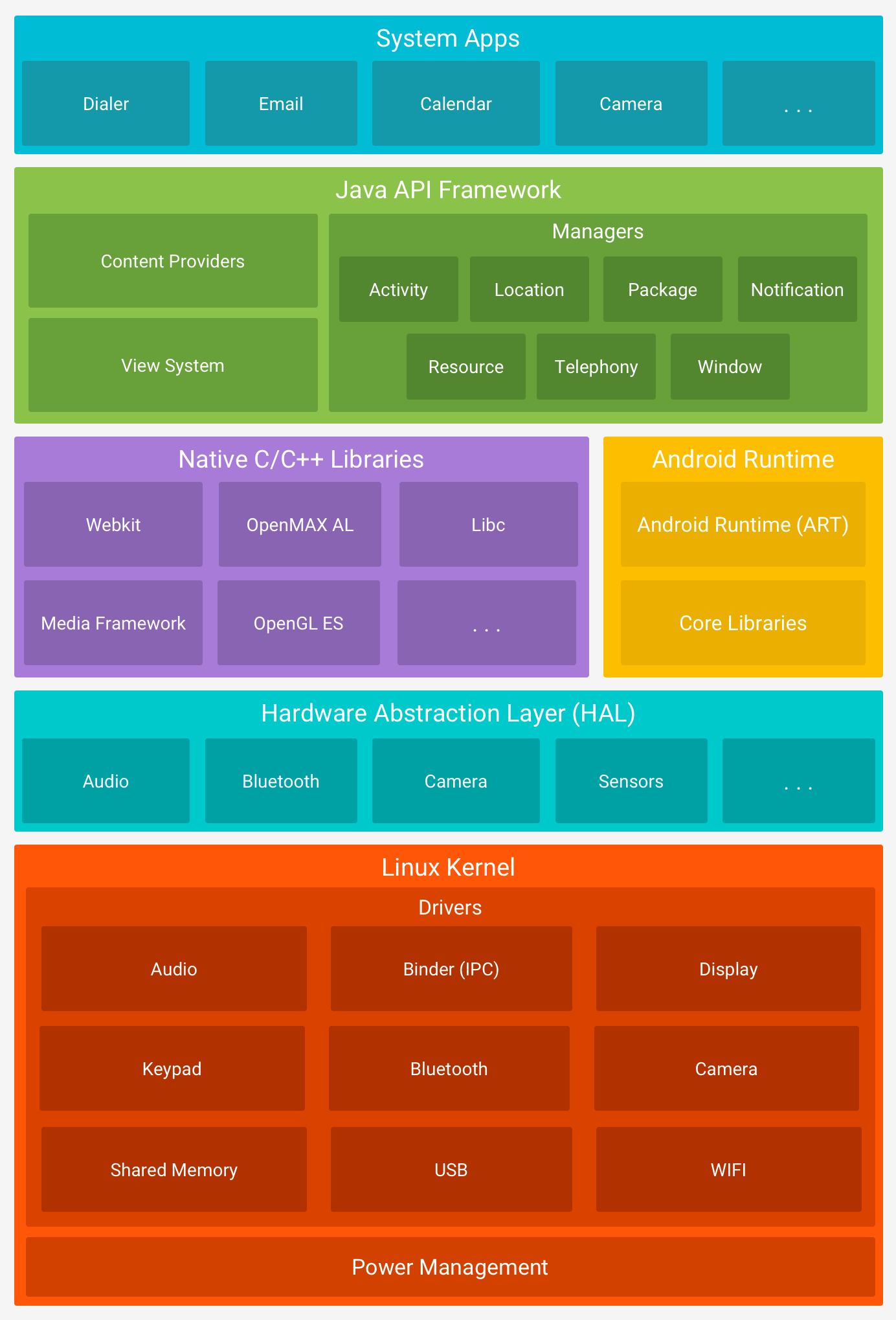
- System Apps
-> System Apps is the top layer core component of the platform architecture. This component, already comes with pre-installed apps like:Apps Calender. Messaging. Camera. Browser. Maps. Settings. -> Pre-installed apps can only be modified on rooted devices.
- Java API Framework
-> This component provides software tools and interfaces for building Android applications. Below are some of the components tha Java API Framework provides:Components View System. Resource Manager. Notification Manager. Activity Manager. Content Providers. Location Manager. Package Manager. - Native C/C++ Library
-> The Native C/C++ Libraries component is a set of libraries written in the C and C++ programming languages, and are included in the Android operating system. The usage of C/C++ allows or enables developers to talk directly to the hardware, or make use of the hardware resources, also hardening the security. ART & HAL, make use of these libraries. That means the libraries need to be included in ART & HAL components. Applications can access these libraries through the Java Native Interface (JNI)(framework that allows Java code running in a Java Virtual Machine (JVM) to interact with applications and libraries written C and C++ or other languages), while programmers can use the Android NDK to access native libraries directly from their native code. - Android Runtime (ART)
-> Android Runtime (ART) is the managed runtime environment used by the Android operating system to execute applications.
-> ART uses Ahead-of-Time (AOT) compilation. With AOT, application code is compiled into native machine code at install time, resulting in faster app launch times and improved runtime performance.
-> ART is capable of running multiple virtual machines concurrently, even on low-memory devices, and it executes applications packaged in the DEX (Dalvik Executable) format. Some of the core features and benefits of Android Runtime include:
ART Features Improved garbage collection. Better memory management. Better debugging support. Optimized compression of the DEX file. - Hardware Abstraction Layer (HAL)
-> software layer that provides the Android operating system with a standardized interface for interacting with hardware components, such as cameras, Bluetooth, sensors, and input devices. - Linux Kernel
-> Linux Kernel is the foundation of the android platform.
- System Apps
Dalvik VM
-> The Dalvik Virtual Machine (DVM) was developed by Google and introduced with the first version of Android in 2008.
-> Android applications written in Java or Kotlin are compiled into Java bytecode and then transformed into Dalvik bytecode, packaged in .dex (Dalvik Executable) or .odex (Optimized Dalvik Executable) file formats.
-> Unlike the Java Virtual Machine (JVM), which is stack-based, the Dalvik VM is a register-based virtual machine.
-> This architectural difference allows for more efficient execution on devices with limited CPU and memory resources, which is ideal for mobile environments.
-> ART maintains compatibility by using the same .dex bytecode format as Dalvik, but differs significantly in its execution model. While Dalvik used Just-in-Time (JIT) compilation, ART initially used Ahead-of-Time (AOT) compilation — compiling bytecode into native machine code at install time, resulting in faster startup and improved performance.
-> In later Android versions, ART evolved to include hybrid JIT + AOT and Profile-Guided Optimizations (PGO), further enhancing runtime efficiency and battery performance.
- Rooting:
-
Android separates the flash storage into the following two main partitions.
->/system/: This partition is used by the operating system
->/data/: This partition is used for user data and application installations. - In Android, users don’t have root access to the operating system, and some partitions (like
/system/) areread-only. - However, rooting the device can be achieved by exploiting security flaws.
- Rooted Android devices are also more susceptible to malicious viruses and malware, since the rooting process disables some of the built-in security features of the operating system.
-
- Important Directories
- Android’s file structure is very similar to other Linux distributions.
- The directories listed below are some of the most important to consider while conducting Android app assessments.
Directories Description /data/dataContains all the applications that are installed by the user /data/user/0Contains data that only the app can access /data/appContains the APKs of the applications that are installed by the user /system/appContains the pre-installed applications of the device /system/binContains binary files /data/local/tmpA world-writable directory /data/systemContains system configuration files /etc/apns-conf.xmlContains the default Access Point Name (APN) configurations. APN is used in order for the device to connect with our current carrier’s network /data/misc/wifiContains WIFI configuration files /data/misc/user/0/cacerts-addedUser certificate store. It contains certificates added by the user /etc/security/cacerts/System certificate store. Permission to non-root users is not permitted /sdcardContains a symbolic link to the directories DCIM, Downloads, Music, Pictures, etc.
Android Security Features
- Before we go further, we need to understand the following:
- Kotlin and Java are the two primary languages used to develop Android applications.
- The Android SDK tools compiles the application source code along with resource files and assets into an Android Package (APK).
- An APK is an archive file with a .apk extension that contains all the components needed to install and run an Android app, including compiled bytecode (.dex), manifest metadata, resources, and native libraries.
- Each Android application runs within its own isolated security sandbox, enforced by the underlying Linux-based architecture.
- This sandboxing model is supported by several core Android security features:
| Security Features |
|---|
| Android is a multi-user Linux system where each application is treated as a separate user. |
| By default, the system assigns each app a unique Linux user ID (UID). This UID is used by the system for access control, but is not exposed to the app itself. |
| File system permissions ensure that only the app assigned a particular UID can access its own files. |
| Each app runs in its own process, and each process runs in a separate instance of the Android Runtime (ART) virtual machine, ensuring memory isolation. |
| The system launches the app's process as needed and terminates it when no longer required or when reclaiming system resources. |
| Android enforces the principle of least privilege, meaning apps only receive the permissions necessary to perform their core functionality. Additional privileges must be explicitly declared in the app's manifest and approved by the user (or system, depending on the API level). |
- Android enforces the principle of least privilege, meaning apps only receive the permissions necessary to perform their core functionality.
-
Additional privileges must be explicitly declared in the app’s manifest and approved by the user (or system, depending on the API level).
- Application Sandbox:
- Android uses Linux’s user-based security model to isolate applications by assigning each app a unique user ID (UID) and running it in its own process.
- This creates a kernel-level application sandbox that enforces strict boundaries between apps and the system, preventing unauthorized data access or code execution across app boundaries.
- Apps cannot interact with each other or access system resources beyond their privileges unless explicit permissions are granted.
- Because the sandbox is enforced by the Linux kernel, these protections apply uniformly to all code running above the kernel, including native binaries, OS services, libraries, and user applications.
- Escaping this sandbox requires compromising the kernel itself, typically through a privilege escalation exploit.
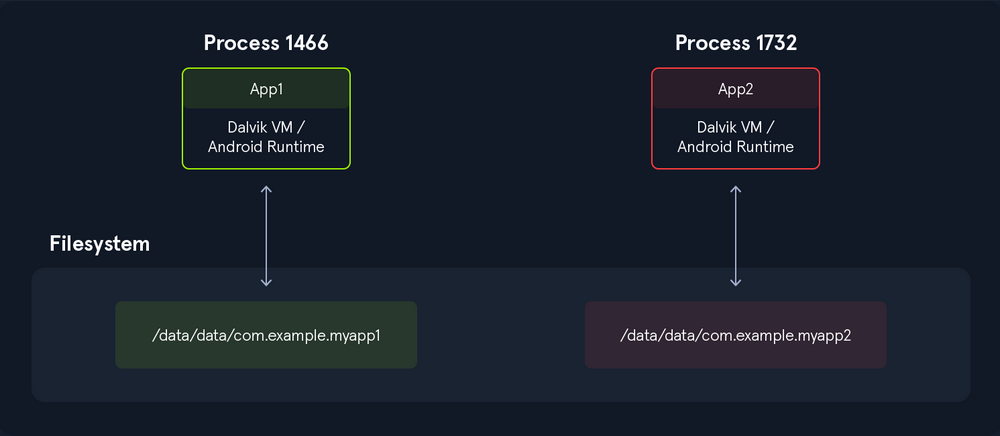
- Executing the following command, we can see that all applications have a different UID.
.png)
- many other protections have been introduced to strengthen app and system isolation.
- The following protections were introduced in previous Android releases.
Additional Protections SELinux Mandatory Access Control (MAC): Separates the system from the apps. SELinux sandbox extension: Isolates apps across physical users. Filter seccomp-bpf: Sets a limit to the syscalls that apps are allowed to use. Limited raw view of the filesystem: No direct access to paths like /sdcard/DCIM.
- The following protections were introduced in previous Android releases.
- Application Signing:
- To install an application on a device or upload it to the Play Store, the APK file must be signed.
- Signing the APK is crucial for security, as it protects the package from malicious modifications.
- The image below shows the flow of signature validation when an application is installed.
.PNG)
- v1 (JAR Signing): The original scheme based on JAR signing. Basic integrity protection. Vulnerable to APK tampering(adding malicious files to unprotected areas, and stripping signatures).
- v2 (APK Signature Scheme v2): Introduced in Android 7.0 (Nougat). Signs the entire APK as a single file, protecting against unauthorized modifications. Much more resilient to tampering than v1.
- v3 (APK Signature Scheme v3): Introduced in Android 9.0 (Pie). Adds support for key rotation, allowing apps to update their signing key securely while maintaining backwards compatibility with previous versions.
- v4 (APK Signature Scheme v4): Introduced in Android 11. Designed for incremental updates (e.g., with Google Play’s “apex” modules). It provides a signature for a single APK but is not used for full APK verification at install time.
- Signature v2 and v3 perform checks that invalidate the APK file if there are any modifications.
- This way, attacks like injecting DEX files into the APK file are prevented.
- Signature Scheme v1, however, is vulnerable to this kind of attack.
- The Janus vulnerability (CVE-2017-13156) allows malicious actors to inject DEX files into the APK-without affecting the signatures-in cases where the APK is signed using the Signature Scheme v1.
- As a result, they can install and run the modified app.
- Verified Boot:
- Verified Boot is an Android security feature that ensures the integrity of the operating system.
- This is achieved using a unique set of cryptographic keys to sign and verify the boot image and ensure that only the authorized parties can modify the system.
- While Android is booting up, each stage verifies the integrity and authenticity of the next stage, and if the signature is valid, then the device boots up normally.
- Otherwise, the device either won’t boot, or it will provide the user with a message updating them that the device is tampered with.
- Apart from this, Verified Boot utilizes Rollback Protection to prevent exploits from becoming persistent.
- This is done by ensuring that Android is only updating to the newest versions.
- The recommended boot flow for a device is as follows:
.PNG)
- APK Structure:
- The Android Package Kit file, commonly known as an APK, is the file format used by the Android operating system to distribute and install applications.
- An APK is essentially an archive that contains all the components needed for an Android app to run.
- Among its contents is the application’s compiled code, stored in a single DEX (Dalvik Executable) file.
- When an Android application is compiled, the Java (or Kotlin) source code is first converted into Java bytecode, which is then transformed and optimized into a DEX file.
- These DEX files are executable and can be interpreted by the Dalvik Virtual Machine (DVM) or the Android Runtime (ART), depending on the device and Android version.
- In addition to compiled code, APK files include resources such as assets, images, UI layouts, and the AndroidManifest.xml file (all of which are necessary for the application to function).
- APK files use the .apk extension and, since they are ZIP-based archives, they can be unpacked with standard tools such as the unzip command in Linux.
.PNG)
- The files extracted from the APK are encoded, and neither the source code nor the configuration files are human-readable.
.PNG)
- The image below shows the unzipped structure of an APK file:
.PNG)