Disk Imaging
Disk imaging: Core Theory
So disk imaging, takes a copy of permanent storage devices like (USBs, SSDs, HDDs, SD cards). Formally, it is an electronic copy(bit-for-bit) of a drive, including all files(even deleted/hidden files), file system structures(FAT, NTFS, EXT4) and unallocated space(where deleted files linger).
Why this matters?
Disk imaging matters because it helps preserve evidence(the original remains untouched), basically we do not want to temper with the original system. You get to analyse safely meaning you can modify the data with no risks, play around with the copy without messing up the original data evidence. and the most important part is that it helps recover deleted files from anallocated space.
Basic Tools:
- Autopsy - GUI-based, beginner friendly.
- Binwalk - extract embedded files.
- Foremost/Scapel - recovers deleted files.
- Volatility - for memory dumps, not disk images
Autopsy
- Here is a typical example of autopsy(gui):
.png)
- It has useful features
| Feature | What it does | Use case |
|---|---|---|
| File Browser | Shows literally all files | Helps find suspicious files |
| Hex Viewer | Allows you to inspect raw bytes(header analysis) | You can check the magic bytes |
| Keyword Search | Scans for strings(e.g CTF{.*}) | Find hidden flags in slack space |
| Timeline Analysis | Shows file activity timelines(who edited what and when) | Track attacker actions |
| Hash Filtering | Identifies known files(e.g Malware hashes) | Spot modified files |
Alternatively: Command-line approach
- The Sleuth Kit (TSK) - A suite of command-line tools for forensic analysis of disk imaging.
- Installation:
sudo apt install sleuthkit - Essential commands:
- Installation:
| Command | Purpose | Example Use Case |
|---|---|---|
mmls |
Lists partitions in the disk image | mmls disk.img finds hidden partitions as well |
fls |
List files/dirs(including deleted) | fls -r -d disk.img Recursive(-r) + deleted file(-d) |
icat |
Extracts a specific file by inode | icat disk.img 45 > file.txt Recover file with inode 45. |
istat |
Show file metadata(timestamps) | istat disk.img 45Checks when the file was modified. |
fsstat |
File system details(block size, type) | fsstat disk.img just confirms if, it's FAT/NTFS. |
- A few examples:
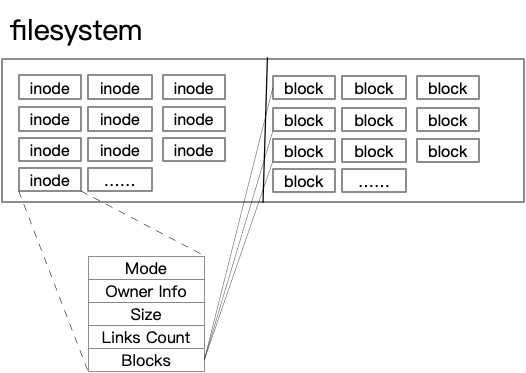
mmls disk.img # Find partition offset (e.g 2048) fls -o 2048 disk.img # List files in partion icat -o 2048 disk.img 123 > secret.txt # Extract file with inode 123 - What exactly is inode: Inodes are like file ID cards they don’t store the actual data but help investigators understand and recover critical file details during forensic analysis.
- dd + foremost/scapel - File Carving, when you need to recover deleted files or extract embedded data.
- bulk_extractor - Faster Data Scanning, extracts emails, credit cards, URLs, and other patterns from disk images.
- photorec - Recovers files even if the file system is corrupted.
- Volatility - This is for memory dumps, not for disk images but necessary to be included. It is a must know CLI tool for memory forensics(.raw, .mem files).