CPU Scheduling
- CPU Scheduling is the decision-making process, the operating system (OS) uses to choose which process runs on the CPU next.
- Why Do We Need It? (The Problem)
- The fundamental problem is multiprogramming.
- Modern computers are designed to run multiple processes “concurrently.” However, a single CPU core can only execute one instruction at a time.
-> CPU-Bound Processes: Spend most of their time performing computations on the CPU (e.g., calculating a complex spreadsheet, compiling code).
-> I/O-Bound Processes: Spend most of their time waiting for input/output operations to complete (e.g., waiting for a keypress, reading from a disk, loading a web page). They use the CPU in short bursts.
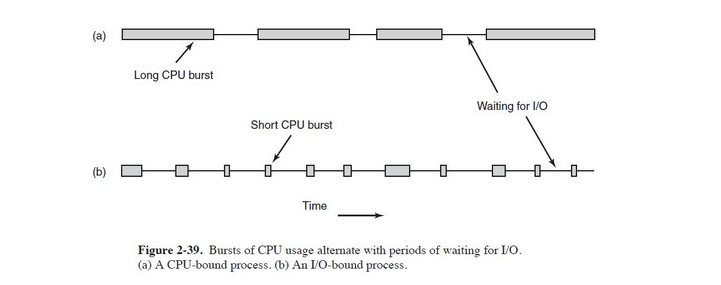
- Hence, If the OS let a CPU-bound process run uninterrupted, any I/O-bound process would be stuck waiting forever, leading to terrible system responsiveness. Scheduling is the solution to this.
- To understand scheduling, we need to know the state of a process and the queues they live in.
- Process States
- Running: The process is currently executing on the CPU.
- Ready: The process is lloaded in memory and able to run, but is waiting for its turn on the CPU.
- Blocked/waiting: The process cannot run until some external event occurs (e.g., I/O operation finishes, a signal is received).
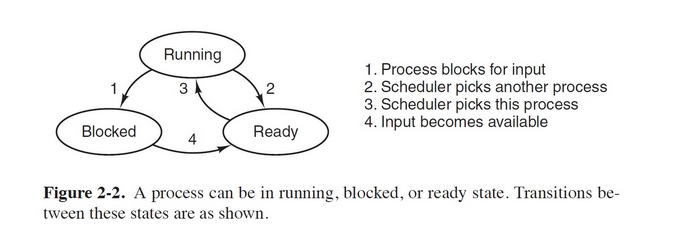
- The Ready Queue
- This is the most important queue.
- It’s a list of all processes in the Ready state, waiting for the CPU.
- The Scheduler:
- The part of the OS (specifically, the kernel) that selects the next process from the ready queue to run.
- The Dispatcher
- The module that gives control of the CPU to the process chosen by the scheduler.
- Preemptive vs. Non-Preemptive Scheduling
This distinction is fundamental and dictates the behavior of the entire operating system.
- Non-Preemptive Scheduling
- The Core Idea: Once a process is allocated the CPU, it keeps the CPU until it voluntarily releases it. The OS cannot take the CPU back.
- Algorithms that are Non-Preemptive:
- First-Come, First-Served (FCFS)
- Non-Preemptive Shortest Job First (SJF)
- Key Characteristics:
- Simplicity: Very easy to implement.
- Low Overhead: Fewer context switches because the OS only intervenes when the process willingly gives up the CPU.
- Poor Responsiveness: A long-running CPU-bound process can monopolize the CPU, making the system unresponsive for interactive users. This is the fatal flaw.
- Not suitable for multi-user/time-sharing systems.
- Preemptive Scheduling
- The Core Idea: The OS can forcefully take the CPU away from a running process after a certain amount of time or when a higher-priority process becomes ready.
- After the cpu is taken away, the process is moved back to the ready queue.
- Essential for modern OSes.
- Algorithms that are Preemptive:
- Round Robin (RR)
- Shortest Job First (Shortest Remaining Time First - SRTF)
- Priority Scheduling (if preemptive)
- Key Characteristics:
- High Responsiveness: Preemption is essential for interactive systems. It guarantees that all processes get a share of the CPU within a reasonable time frame.
- Higher Overhead: More frequent context switches increase system overhead.
- Risk of Race Conditions: Because a process can be interrupted at any time, great care must be taken with shared data (requires synchronization mechanisms like semaphores and mutexes).
- Scheduling Criteria: How Do We Judge a Algorithm?
- CPU Utilization
- The percentage of time the CPU is busy (not idle).
- Throughput
- The number of processes that are completed per unit of time.
- Turnaround Time
- The total time taken from when a process submits itself until it completes. “The total journey”
- Waiting Time
- The total time a process spends waiting in the ready queue.
- Response Time
- The time from when a process is submitted until it produces its first response.