Network Packet Analyzer
Network Packet Analyzer
- The program i have to design has capture network traffic and display key information about each packet.
- But What Is A Packet?
- Packets are a building block of internet communication, They travel across networks.
- For instance, a message that shared on the internet would be broken down into these packets(small units).
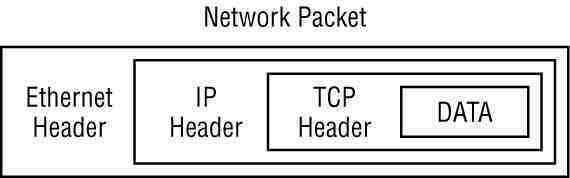
- Every packet contains two main components:
- Header
- Payload
- Here is a typical picture of a packet:
The OSI Model and Packet Layers
- I think it also important to include the OSI(Open Systems Interconnection) model, as it properly demostrate how the packet is encapsulated and what it carries.
- Physical Layer(1) -> This could be electrical signals or wireless transmission(basically how the packet travels from computer to another)
- Data Link Layer(Ethernet)(2) -> MAC address, local network delivery.
- Source/Destination MAC addresses.
- Protocol type (IPv4,IPv6).
- Quick Intro to IPv4 & IPv6:
- IPv4 -> This is an old version of IP addresses, it uses 32-bit address and offers a little number of IP addresses(Not enough for the fast growing population and also not to mention that one person can own about 3 devices each with a unique ip address).
- IPv6 -> It was introduced to help the shortage of IP addresses from IPv4, as it uses 128-bit addresses, offering a siginificant large address space and it is much secure.
- Network Layer(IP)(3) -> Logical address routing
- Source/Destination IP addresses
- Protocol(TCP,UDP,ICMP)
- Time To Live(TTL)
- Transport Layer(TCP/UDP)(4) -> End-to-end communication
- Source/Destination ports
- Sequence numbers
- Flags (SYN, ACK, etc)
- “Three-way handshake”
- SYN - Synchronize(The client initiates a connection by sending a TCP segment with a SYN flag)
- SYN-ACK - The server responds with a TCP segment that has both the SYN and ACK flags set.
- ACK - Acknowledge(Lastly, the client sends a final TCP segment with the ACK flag set and this completes the “three-way handshake”)
- Quick Intro to TCP & UDP:
- TCP(Transmission Control Protocol) -> This one is connection-oriented, meaning it establishes a connection between sender and receiver before data transfer, and one example is web browsing. It ensure that no data is lost along the way.
- UDP(User Datagram Protocol) -> Where as, UDP is connectionless, it sends data without establishing a prior connection, and a few examples are online gaming and video streaming. It is not reliable, as data can be lost, it is focused on in faster transmission.
- Application Layer(5) -> This layer holds the actual data.
- HTTP Request
- DNS queries
- Email messages
Tools
- Lastly please allow me to briefly talk about the tool used in analyzing the network packets.
- The tool is called Wireshark, and it is a tool that is mostly recommended when analyzing or sniffing the messages sent between the source IP address and the destination IP address.
- In CTF Challenges, we normaly get a file with a .pcap extention:
- PCAP -> which stands for Packet Capture, it is a file that used to store network traffic captured during packet sniffing.
- This shows the importance of understanding the packets.
- Another tool is tcpdump it is also a packet sniffing tool found in linux, the usage is as follows:
tcpdump -i eth0 -n-iinterface flag(specifies which network interface to listen on).eth0This is normally our Ethernet interface.-nallows us to disable the name resolution, hence it will show us the IP/port as raw, rather than the name.
- Python also offers a library called scapy that allows us to manipulate the packets. I will be using that library to develop the program for Packet Analyzer.
- Installation:
pip install scapy
Common Protocols and Their Ports
- One last important, concept.
| Protocol | Port | Description |
|---|---|---|
| HTTP | 80 | Web traffic |
| HTTPS | 443 | Secure web traffic |
| DNS | 53 | Domain Name Resolution |
| SMTP | 25 | Secure Email sending |
| POP3 | 110 | Email Retrieval |
| FTP | 21 | File transfers |
| SSH | 22 | Secure remote access |
| DHCP | 67/68 | Automatic IP Configuration |
Code breakdown
- Please allow me to say this, i have specifically targeted the packets from the website service, otherwise including other services is complex, it would take me some time to research more and make sure that i understand. Also, I tried to use the Windows NPCAP API, but i coulnd’t, it did not want to work, which was very important for this task, but alternatively, i tried this approach.
- The code below is focused on HTTP/HTTPS ports.
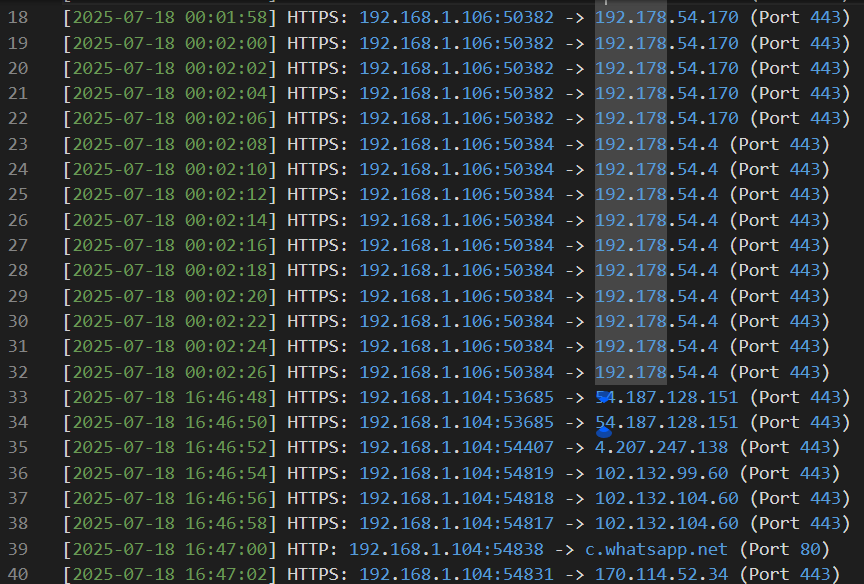
- It analyzes the packets from the websites you visited or visit as it is running, it won’t show the name of the websites, because the https is blocking that, but there is a way bypass that restriction.
- This is gonna take your local ip address as the source and destination ip adress(website you visit or currently visiting).
- (TCP/IP protocol) and again, you will notice that the ip changes a little, now and then, that’s because, the system, assigns it a different ip everytime you run the code.
- (TCP/IP Protocol) The ports as well, Every new connection requires a unique source port + destination port pair.
- Also, make sure when you run the python file, you click yes for admin priviliges otherwise it won’t run.
- The output we get, is a list of how typical packets look like.
- Required modules
from scapy.all import * import datetime import socketsocketFor some network utilities, you will see below.
- Configuration section
LOG_FILE = "web_visits.log" PACKET_LIMIT = 30 DELAY_SECONDS = 2- Planning to store the packets to the
web_visits.logfile. - Also the packet limit with a delay included, otherwise it would flood the console.
- Planning to store the packets to the
- The main function
def log_visit(packet):
  if not packet.haslayer(TCP) or not packet.haslayer(IP):
      return
  # --
  src = f"{packet[IP].src}:{packet[TCP].sport}"
  dst = f"{packet[IP].dst}:{packet[TCP].dport}"
  timestamp = datetime.now().strftime("%Y-%m-%d %H:%M:%S")
  # --
  if packet[TCP].dport == 80 and packet.haslayer(Raw): # HTTP (Port 80)
      try:
          host = next(line.split("Host: ")[1] for line in str(packet[Raw].load).split('\\r\\n') if "Host: " in line)
          log = f"[{timestamp}] HTTP: {src} -> {host} (Port 80)"
          print(log)
          return log + "\n"
      except:
          pass
  # --
  elif packet[TCP].dport == 443: # HTTPS (Port 443)
      log = f"[{timestamp}] HTTPS: {src} -> {packet[IP].dst} (Port 443)"
      print(log)
      return log + "\n"
# --
  return None
main function
def main(): print(f"\n Monitoring web traffic (HTTP/HTTPS)..\n") print("Press Ctrl+C to stop\n") # -- packet_count = 0 with open(LOG_FILE, "a") as log_file: # Note that we append instead of replacing the packets def callback(packet): nonlocal packet_count if packet_count >= PACKET_LIMIT: return # -- log_entry = log_visit(packet) if log_entry: log_file.write(log_entry) packet_count += 1 time.sleep(DELAY_SECONDS) # already discussed above # -- sniff(prn=callback, store=False, filter="tcp port 80 or tcp port 443") # -- print(f"\n...Captured {packet_count} packets. Log saved to '{LOG_FILE}'...")- sniff() is a built in fuction from scapy.
- sniff(prn=callback), allows us to specify another function
- N.B sniff(store=false), prevents memory overload.
- You can find the full code on my github(PRODIGY_CS_05).
- I plan to deep dive on this, when i find time🙏.
- This was the output: